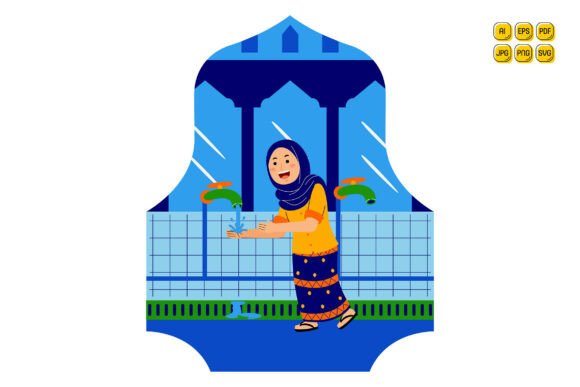
Woman Washing Hands at Fountain
Imagine needing a clean, symbolic, and universally resonant visual for a public health campaign—something that conveys hygiene, care, and calm all at once. That’s where Woman Washing Hands at Fountain becomes more than just an illustration: it’s a flexible, narrative-rich design asset grounded in real-world communication needs.
This vector set isn’t built for decoration alone. It’s engineered for action—designed so professionals across disciplines can adapt it precisely to their goals without wrestling with constraints. Whether you’re launching a wellness blog, updating clinic signage, designing a school handwashing poster, or building a responsive healthcare landing page, the core image carries immediate visual clarity—and the file package ensures it integrates seamlessly into your workflow.
Why This Illustration Fits Real Projects—Not Just Stock Galleries
Unlike generic clipart or rigid raster images, Woman Washing Hands at Fountain delivers full vector control. Every shape—the fountain basin, the flowing water arc, the woman’s silhouette, her sleeves, even individual droplets—is layered and named. That means you don’t just recolor a flat blob; you adjust the sleeve hue independently from the water, mute the fountain stone texture while keeping the hand gesture vibrant, or isolate the background for transparent overlays on social banners.
Take a small business owner launching a natural soap line: they might pull the fountain’s stone texture, replace it with a subtle linen pattern, shift the water to sage green, and place the figure beside a custom product shot—all within Illustrator, no redrawing needed. A university health educator could extract just the hand-and-water motion, drop it into a PowerPoint slide about proper technique, and animate the flow path using SVG paths—no external plugins required.
Scalability That Doesn’t Compromise Clarity
At 5000 × 5000 pixels, the high-resolution JPG and PNG files hold up crisp on digital billboards, trade show backdrops, or printed brochures—even when scaled to 3 meters wide. But resolution alone doesn’t guarantee usability. What matters is how cleanly the flat design translates across sizes. Because this set uses deliberate stroke weights, balanced negative space, and intentional simplification (not oversimplification), the gesture remains legible at 64px for app icons and expressive at 2000px for wall graphics.
Compare that to photorealistic assets: shrink them, and facial details blur; enlarge them, and pixelation creeps in. With Woman Washing Hands at Fountain, the vector foundation eliminates that trade-off entirely. You decide the size—and the message stays sharp.
Format Flexibility Meets Real Workflow Needs
The inclusion of AI, EPS, SVG, PDF, JPG, and PNG isn’t about checking boxes—it reflects how different tools and platforms actually function. Need to tweak layers mid-design? Open the AI file in Illustrator. Preparing assets for a developer who builds with React? Hand off the SVG—it’s lightweight, code-friendly, and supports CSS-driven color changes. Sending final art to a print vendor? The PDF preserves fonts and spot colors; the EPS ensures legacy compatibility with older RIP software.
And because each format retains the original structure (no flattened layers or embedded raster), switching between them doesn’t mean starting over. Adjust colors in AI, export updated SVG for web use, then re-export PNG for email headers—all from the same source, with consistent alignment and proportions.
Who Benefits Most—and Why Timing Matters
Creative professionals under deadline pressure gain the most immediate value. A freelance designer pitching a hygiene awareness campaign to a municipal client can draft three distinct directions in under an hour: one with muted earth tones for a sustainability angle, another with bold cerulean and white for a youth-focused initiative, and a third combining the fountain figure with custom typography and icon overlays—all using the same base file.
Educators and nonprofit communicators benefit from consistency across touchpoints. A single illustration becomes the anchor for a classroom poster, the hero image on a donation page, the central graphic in an animated explainer video (using SVG morphing), and the watermark on printable handwashing checklists—each version visually unified, yet contextually tailored.
That said, this set works best when you need symbolic, human-centered visuals—not photorealism or hyper-specific cultural representation. If your project requires depicting exact regional attire, precise age demographics, or complex environmental context (e.g., a drought-affected village), pairing this illustration with custom photography or commissioned art may yield stronger resonance. It excels where clarity, adaptability, and cross-platform cohesion matter more than documentary specificity.
Building Beyond the Single Image
The real strength lies in combinatorial potential. These aren’t 100 isolated pictures—they’re 100 modular elements designed to interlock. You might take the fountain base from Illustration #7, pair it with the hand gesture from #22, add the leaf motif from #48, and overlay the sunburst from #91 to create a bespoke “renewal” visual for a spa brand. Because every component shares the same flat design language—consistent line weight, harmonized proportions, and neutral perspective—blending feels intuitive, not jarring.
This modularity also supports iterative testing. Run two versions of a landing page CTA: one with the woman facing left (suggesting approach or invitation), another mirrored to face right (implying progression or next steps). Track engagement. Swap only the SVG file—no redesign, no dev time. That kind of agility lowers the barrier to evidence-based visual decisions.
A Note on Practical Customization
“Easy to edit” means what it says—but only if you’re working within compatible tools. Adobe Illustrator users will find layers immediately navigable. Affinity Designer or CorelDRAW users can open EPS or PDF files with minor layer flattening. For those using Canva or Figma, the SVG and PNG files integrate smoothly, though advanced vector edits (like reshaping individual paths) require exporting to Illustrator first. Knowing your toolchain helps set realistic expectations—and makes the included format variety genuinely useful, not just theoretical.
Finally, consider longevity. Flat design avoids trends that date quickly—no skeuomorphic shadows, no exaggerated gradients. The composition centers dignity and quiet intention, not urgency or alarm. That gives your materials staying power across campaigns, annual reports, and multi-year initiatives without feeling outdated.
Whether you’re illustrating a global WHO partnership or refreshing the header on a local yoga studio’s newsletter, Woman Washing Hands at Fountain offers grounded symbolism, technical flexibility, and thoughtful execution—all in one cohesive, editable package.