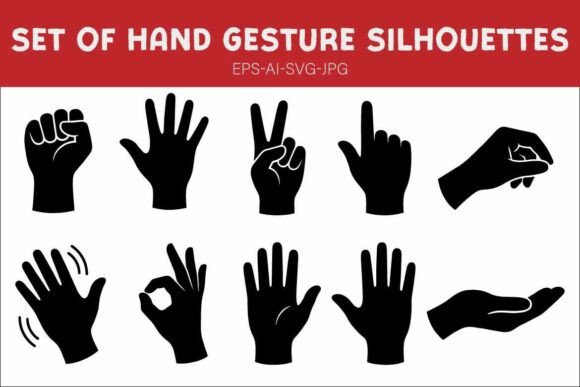
Hand Gesture Silhouette Bundle
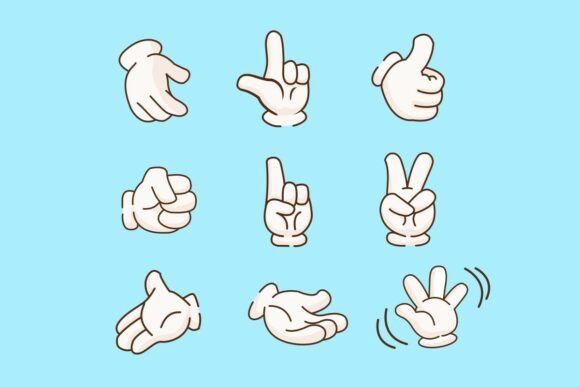
Clear visual communication doesn’t always need color, detail, or realism—sometimes it needs simplicity, intention, and instant recognition. That’s where the Hand Gesture Silhouette Bundle becomes quietly indispensable. It’s not just a collection of icons; it’s a carefully curated set of 10 high-fidelity black silhouettes representing universal hand signals: closed fist, open palm, peace sign, pointing finger, OK sign, waving hand, thumbs up, victory sign, “stop” hand, and a relaxed hand with fingers slightly spread. Each is drawn with consistent line weight, balanced proportions, and thoughtful negative space—designed to scale cleanly from a 16-pixel favicon to a 6-foot trade show banner.
Why gesture-based visuals resonate—and why consistency matters
Human beings process gestures faster than text. A pointing finger directs attention without a single word. A waving hand conveys greeting or farewell across cultures and age groups. An open palm signals honesty or pause. These aren’t decorative flourishes—they’re functional visual cues rooted in shared understanding. But inconsistency breaks that trust. Using mismatched hand icons from different sources—varying stroke weights, angles, or proportions—undermines professionalism and weakens message clarity. The Hand Gesture Silhouette Bundle solves that by offering a unified visual language: same style, same scale logic, same expressive intent. That cohesion matters most when your audience is scanning quickly—on a slide during a team meeting, in an Instagram carousel, or on a printed classroom poster.
Real-world applications that save time and sharpen impact
For educators designing lesson slides or printable worksheets, these silhouettes help illustrate abstract concepts—like using the “stop” hand beside a safety tip, or the “pointing finger” to highlight key vocabulary. No more cropping low-res PNGs or wrestling with vector paths in Illustrator just to get alignment right. With ready-to-use SVG and EPS files, you drop them in and move on.
Marketers building social media campaigns benefit similarly. A clean “thumbs up” silhouette works as a subtle background element behind customer testimonials. A minimalist “OK sign” can anchor a checklist graphic for a product launch email—without competing with copy or brand colors. Because all files are black-on-transparent, they adapt instantly to light or dark themes, and require zero recoloring in Figma or Adobe XD.
Freelance designers preparing pitch decks for clients appreciate how quickly these assets elevate presentation polish. Instead of defaulting to overused stock photos or generic arrows, they insert a purposeful “open palm” icon beside a value proposition—suggesting openness and transparency—or pair the “peace sign” with a sustainability initiative. It’s subtle, but it adds narrative texture without clutter.
Format flexibility built for how you actually work
The Hand Gesture Silhouette Bundle includes EPS, AI, SVG, and JPG files—not as a marketing checkbox, but because each serves a distinct workflow need. SVG files embed cleanly into websites and CMS platforms (like WordPress or Webflow) and remain crisp at any screen size. Designers using Adobe Illustrator or Affinity Designer rely on the editable vector layers in AI and EPS for precise adjustments—changing anchor points, adjusting spacing, or combining gestures with custom typography. JPG versions provide immediate use in PowerPoint, Canva, or Google Slides when vector support isn’t available—or when you need a fast preview before final export.
This format diversity means you’re not forced into one software ecosystem. A small business owner using Canva can drag in the JPG and resize freely. A UI designer working in Figma imports the SVG and applies auto-layout constraints. A print designer drops the EPS into InDesign and retains full editability through prepress. No conversion headaches. No pixelation surprises.
Who benefits most—and where to start
Professionals who regularly translate ideas into visual formats see the strongest return: instructional designers building e-learning modules, content marketers producing explainer graphics, UX writers adding micro-interactions to prototypes, and nonprofit communicators creating accessible awareness materials. Educators teaching digital literacy or social-emotional learning also find these silhouettes especially useful—they’re neutral enough to avoid cultural misinterpretation, yet expressive enough to support emotional vocabulary development.
Hobbyists and bloggers may underestimate how much these icons streamline recurring tasks. Think of a weekly newsletter where you highlight “3 things to try”—using the “pointing finger” silhouette beside each bullet saves minutes per issue. Or a personal blog post about mindful communication—embedding the “open palm” and “closed fist” side-by-side illustrates contrast more effectively than paragraphs alone.
A note on fit and thoughtful usage
While versatile, the Hand Gesture Silhouette Bundle is intentionally minimal—black silhouettes only, no outlines, shadows, or gradients. That’s its strength in professional contexts, but it also means it won’t suit projects requiring illustrative flair, character-driven expression, or multicolor branding integration without additional design work. If your brand guidelines mandate custom-colored icons or anthropomorphic styling, this bundle serves best as a foundational layer—you’d recolor or layer over it rather than use it standalone.
Also worth noting: gesture meaning varies across regions. While the “OK sign” reads positively in many Western contexts, it carries different connotations elsewhere. Always consider your audience’s cultural context—especially in global-facing materials. When in doubt, pair the icon with brief, clarifying text or use it in contexts where intent is already clear (e.g., “OK” label beside the gesture).
Practical next steps for better visual consistency
Start small. Pick one recurring use case—like slide headers in presentations—and replace generic arrows or clip art with a matching silhouette from the bundle. Notice how much cleaner the rhythm feels. Then expand: add the “waving hand” to your website’s welcome section, or the “thumbs up” to feedback forms. Because all 10 gestures share visual DNA, scaling usage feels intuitive—not like assembling mismatched parts.
You don’t need to overhaul every asset at once. Even integrating two or three gestures consistently across your most visible materials—email footers, social profile graphics, or workshop handouts—builds recognizability and reinforces tone: calm, intentional, human-centered.
In a landscape saturated with flashy, overdesigned elements, restraint often communicates loudest. The Hand Gesture Silhouette Bundle supports that restraint—not by limiting expression, but by giving you precise, reliable tools to express clearly, efficiently, and respectfully.